
I thought I’d share this with you, just in case it’s been driving you nuts, too.
I’ve been a Mac user for about four years, but have been dragging my feet migrating to Lion (OS X 1.7). More because I was afraid my apps weren’t going to work and I wasn’t too keen on some of the changes. I also haven’t converted to iCloud yet either. 🙁 I have MobileMe and use BusyCal for my calendaring and am wary of how my calendar workflow may change. Now the folks at BusyMac have written instructions on how make the change, but again I’ve been dragging my feet. Putting off the inevitable; especially since MobileMe goes away in a few short weeks. 🙁
Well, I finally upgraded my computer to Lion a few weeks ago; my first step to moving to iCloud [it’s required for iCloud]. It wasn’t so bad. 🙂 Ma’s computer came with Lion so I’ve seen it and realized it really wasn’t all that scary. I have even left my scrolling with the Lion default. More on that another day…
One thing that has driven me nuts is that when I open an app all the windows (or tabs in Safari) pop up when I open an app. Needless-to-say, this has been VERY VERY frustrating. I did some poking around yesterday at lunch and found out how to make it stop. YIPPPEEEEEE!
Open System Preferences (either from the “gear” icon on your Dock or from Finder -> Applications) and you will see something similar to this window…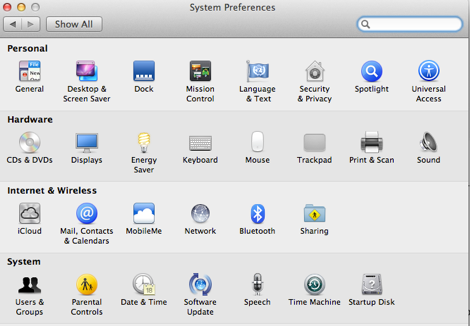
Click on the “General” icon in the top left…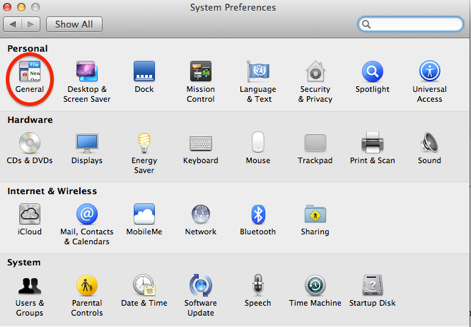
The “General” options are displayed…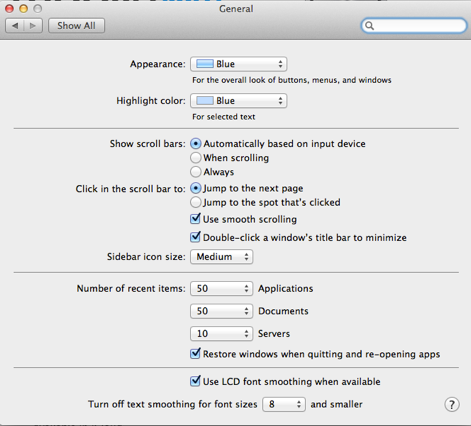
In the third section, uncheck the “Restore windows when quitting and re-opening apps” and then click on the “Show All” button.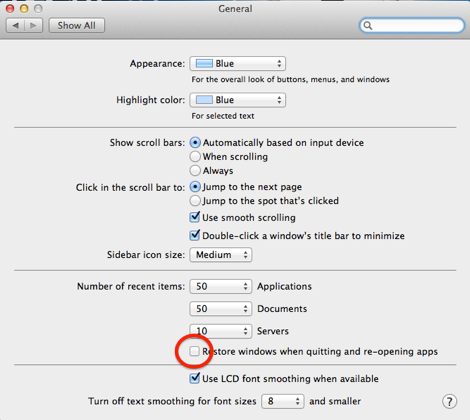
You should now be able to open an app and not have the last opened windows open automatically. 😀
I hope this helps relieve any frustrations you may be experiencing!