We all have our favorite blogs we like to read. The question is how do you like to read them? Some people like to receive them via email or use Google Reader or iPhone/iPad/Android apps like Flipboard or Reeder or reading from their internet browser or they use some other app.
For me, I have always used my email program as my “reader”. I prefer email because I can keep up while I’m away from my computer. Yes, I have an iPhone and an iPad and can use Flipboard or Reeder. In fact, I LOVE the Flipboard interface, but it’s only available on mobile devices. It is great for reading, but you can’t use it to leave comments and we all know as blog writers we love comments. For me, leaving comments using my iPhone is a pain in the butt, so I really prefer using my computer for blog reading and commenting. That’s why I LOVE getting blog posts via email. I can read them in my inbox and then click the link to leave a comment. It seems so straightforward. By using my mail program as my RSS feed reader enabled me to read and comment blogs which don’t provide actual emails.
Several weeks ago I upgraded my computer and everything changed… my blog reading was turned upside down… so much that it really pissed me off. My mail program no longer supported RSS feeds. I was devastated… yes, devastated. I couldn’t easily read my favorite blogs. I went into panic mode. Low and behold this was a known change. It had been discussed in multiple technical blogs, but it was last summer and I completely missed it – I wasn’t keeping up with my technical blog reading back then. 🙁 It’s really too bad because I would have know BEFORE I upgraded and would have been prepared.
OK… where am I going with this??? Well, I was able to get the list of the blogs I had and went and resubscribed to them so I could get them via email. Just about all of them offer that feature, especially if they use Feedburner for their blog syndication.
Unfortunately, one of my favorites doesn’t offer an email subscription and as a result I honestly forget to go read it. I know… I know… my favorite and I forget to read it… I get over 200 emails a day and I forget to go to Google Reader to read that one blog.
I’ve even started not subscribing to blogs if they don’t offer email subscriptions. You don’t want to lose readers if you don’t offer email subscriptions do you?
So, I thought if you are a blog writer and have seen a drop in your readership perhaps your readers are like me and they lost their feeds. Never fear… Stef is here to help. I’m going to show you how to enable Feedburner to deliver via email.
Many people use Google’s Feedburner to deliver their blog’s RSS feeds to readers. If you don’t use a syndicator like Feedburner, I highly recommend that you start.
Let’s get the show on the road…
Login to your Feedburner account (if you don’t have one, create one at http://feedburner.google.com). You will see a window similar to this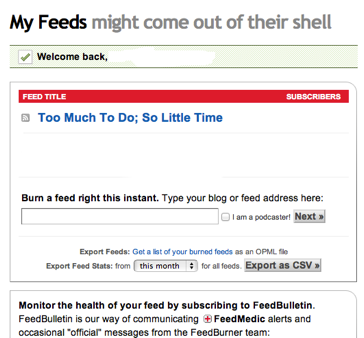
Click on your feed title and you will see a window which has the following across the top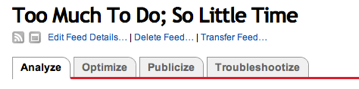
Click on the Publicize tab and you will see the following down the left side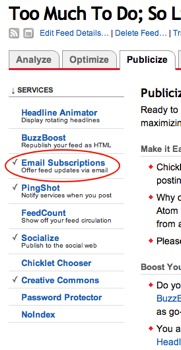
Click on the “Email Subscriptions”, you will have to enable or activate this option. You’ll see four different options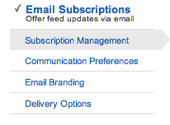
Subscription management – select the language and gives you codes for widgets
Communication preferences – customize the subject line and body of the email sent to subscribers when they opt-in (choose to email subscribe)
Email Branding – customize the subject and title of the email sent
Delivery Options – choose the 2-hour delivery window, no emails are sent if you don’t post anything
Google has instructions on how to setup your blog depending on the type of blog you have.
Email Overview and FAQ (frequently asked questions)
http://support.google.com/feedburner/answer/78982?hl=en&ref_topic=13239QuickStart Guide
http://support.google.com/feedburner/topic/13055?hl=en&ref_topic=13046
I highly recommend adding email subscriptions to your publication and reading options. Don’t you think it’s an added benefit for your readers?